


Workiz has become a common name in the field service software space, especially among HVAC, plumbing, and home service companies looking to manage jobs, scheduling, and customer communication in one system. Over the years, it has built a solid reputation for being a dependable all-in-one platform for service-based businesses.
That said, the software landscape in 2026 looks very different compared to when many companies first adopted it. New tools have emerged, expectations around automation and customization have increased, and businesses are now more selective about the systems they rely on to run daily operations.
In this Workiz review, we’ll take a closer look at what it does well, where it falls short, how much it costs, and who it actually makes sense for. We’ll also explore a few strong alternatives to give a clearer picture of what’s available today for growing service businesses.
What is Workiz?
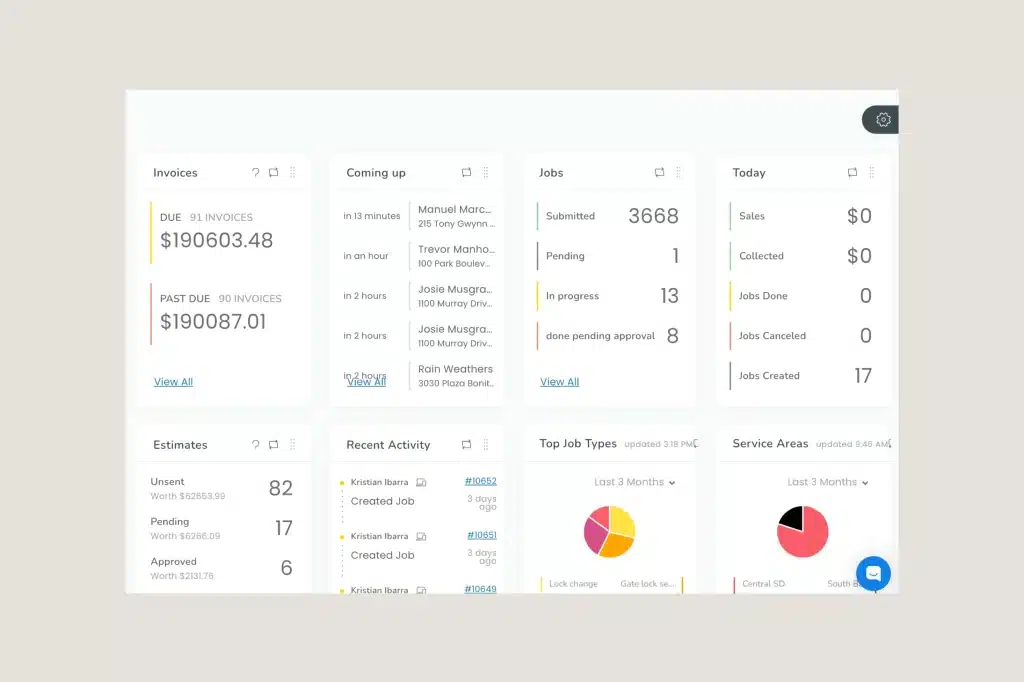
Workiz is best understood as a field service management software specifically for service businesses that rely heavily on job management and scheduling jobs. Instead of just being a simple CRM or invoicing tool, it tries to connect the entire workflow, from the moment a customer calls in, to the job being assigned, completed in the field, and finally invoiced.
What makes it stand out is how much of the day-to-day coordination it tries to centralize. Office teams can manage incoming leads, book jobs, and assign technicians, while field workers use the mobile app to update job status, send invoices, and communicate back with the office.
Quick Overview of Workiz
| Category | Details |
|---|---|
| Software Type | Field service management software |
| Best For | Contractors, trades, service businesses |
| Core Features | Job scheduling, dispatch board, invoicing and customer communication |
| Ease of Use | Moderate learning curve, but straightforward once set up |
| Mobile App | Yes, supports technicians in the field and office coordination |
| Pricing Model | Tiered subscription plans |
| Main Strength | Scheduling and dispatching |
| Main Limitation | Costly, complex pricing with hidden fees and tiered upgrades needed for key features and more users |
Workiz Key Features
Workiz offers a set of tools built around managing service jobs from the first customer call to final payment, and in this Workiz review, it’s clear the platform is mainly focused on keeping office staff and field technicians closely connected in real time throughout the entire workflow.
Key features include:
- Dispatch board for job management: Allows teams to assign and track jobs throughout the day, helping keep technicians and office staff aligned on scheduling.
- Built-in call tracking system: Incoming customer calls can be turned into jobs directly, helping ensure leads are captured and managed within the platform.
- Inventory and stock management: A centralized system for tracking inventory, managing stock levels, and keeping technicians equipped with the parts and equipment needed for upcoming jobs.
- Invoicing and payment processing: Allows users to create and send invoices immediately after job completion, with built-in payment options included.
- Mobile app: Gives technicians access to job details, updates, photos, and communication tools while working on-site.
- Customer history tracking: Stores job records, notes, and communication history so returning customers are easier to manage.
- Basic automation tools: Includes reminders and status updates to reduce manual follow-ups and help keep operations running smoothly.
Workiz Pricing
One of the more debated parts of any Workiz review is the platform’s pricing structure. While Workiz does offer multiple plans for different business sizes, the total cost can rise fairly quickly once additional users, automations, phone features, payment processing, and add-ons are factored in.
Workiz currently offers several pricing tiers, including Lite, Kickstart, Standard, Pro, and Ultimate plans, with pricing increasing based on team size and access to advanced features.
| Plan | Starting Price | Best For |
|---|---|---|
| Lite: 2 users | Free | Best for testing only, not for running a live business due to usage limits |
| Kickstart: 3 users | $225/mo | Small service businesses |
| Standard: 5 users | $275/mo | Growing teams needing more automation |
| Pro: 5 users | $325/mo | Businesses requiring AI features |
| Ultimate | Custom | Larger operations |
Pros and Cons of Workiz
Before the final verdict in this Workiz review, it’s worth looking at both the strengths and limitations of Workiz, as it offers solid tools for service operations but may not fit every business, depending on size and flexibility needs.
Workiz Pros:
- Built-in phone system: Manages and tracks customer calls inside the platform.
- Subcontractor management: Assigns and tracks subcontractors.
- Strong inventory and stock management: Tracks parts and equipment across jobs.
- Robust dispatching: Assigns and monitors jobs in real time.
- Invoicing and payment processing: Creates invoices and processes payments.
Workiz Cons:
- High pricing: Costs can add up quickly as the team grows and features are added.
- Steep learning curve: Takes time to fully understand and set up properly.
- Clunky mobile app: Can feel slow or less smooth compared to newer competitors.
- Must upgrade for basic features: Some essential tools are locked behind higher-tier plans.
Who Should Use Workiz
Workiz is best suited for service-based businesses that rely heavily on scheduling, dispatching, and phone-based job intake, especially in industries like HVAC, plumbing, locksmith, and cleaning services.
It works well for small to mid-sized teams that want an all-in-one system to manage calls, jobs, invoices, and technician coordination in one place without relying on multiple tools.
As highlighted throughout this Workiz review, it tends to fit teams that prefer simplicity and a structured way of handling daily operations, but for businesses looking for more flexibility or control over how their system works, it may start to feel a bit limiting over time.
Best Workiz Alternatives
When comparing field service platforms like Workiz, different tools tend to stand out for different reasons depending on how a business operates. Some focus on simplicity and ease of use, others prioritize flexibility in workflows, and some are built around more predictable pricing or specific operational needs.
In this Workiz review, looking at alternatives helps highlight these differences, especially since scheduling, dispatching, and customer management can vary quite a bit from one platform to another.
1. Clientility
Clientility is designed for service businesses that want to manage their operations in a more unified way without relying on multiple separate tools. It combines scheduling, customer management, payments, invoicing/estimating, and lead follow-up into a single system, helping teams keep operations organized while improving how inquiries are turned into booked jobs.
Compared to traditional platforms, Clientility focuses more on affordability, ease of use, and flexibility, making it a strong option for growing teams that want something less restrictive.
* For a more detailed breakdown, see our full Clientility CRM review.
2. Housecall Pro
Housecall Pro is a well-known alternative that focuses on simple workflows and strong customer communication. It’s often chosen by service teams that want a straightforward system to manage jobs, payments, and client interactions without a steep learning curve.
3. ServiceTitan (for larger companies)
ServiceTitan is built for larger, high-volume service businesses that need advanced reporting, call booking systems, and deeper operational control.
While it is significantly more powerful than simpler tools, it also comes with higher complexity and cost, making it more suitable for established companies.
4. Jobber
Jobber is a widely used field service platform built around keeping everyday operations simple, covering core tools like scheduling, quoting, invoicing, and client management in a clean, easy-to-navigate interface, while also helping service businesses stay organized by centralizing job details, improving communication between office staff and technicians, and making it easier to track work from start to finish.
Final Verdict
After reviewing Workiz in detail, it’s clear the platform is built to handle core field service operations in one place, with a strong focus on dispatching, scheduling, and managing day-to-day job workflows.
It works best as a central system for organizing service operations, helping teams keep track of jobs, communication, and invoicing without needing multiple tools.
Ultimately, the right choice depends on how a business operates and what level of flexibility or workflow control it needs. This Workiz review shows it as a strong option for teams that want structure and reliability in one platform, while others may prefer exploring different tools based on their own operational setup and preferences.
What are the best Workiz alternatives?
Popular alternatives include platforms like Jobber, Housecall Pro, Clientility, and other field service management tools, depending on business size and workflow needs.
What industries use Workiz?
It is commonly used in service-based industries such as HVAC, plumbing, locksmith, cleaning, landscaping and other home service businesses.
Is Workiz easy to use?
It is generally straightforward once set up, but it may take some time for teams to fully get comfortable with all of its features.
Does Workiz have a mobile app?
Yes, it includes a mobile app that allows technicians to view jobs, update statuses, and communicate with the office while in the field.