




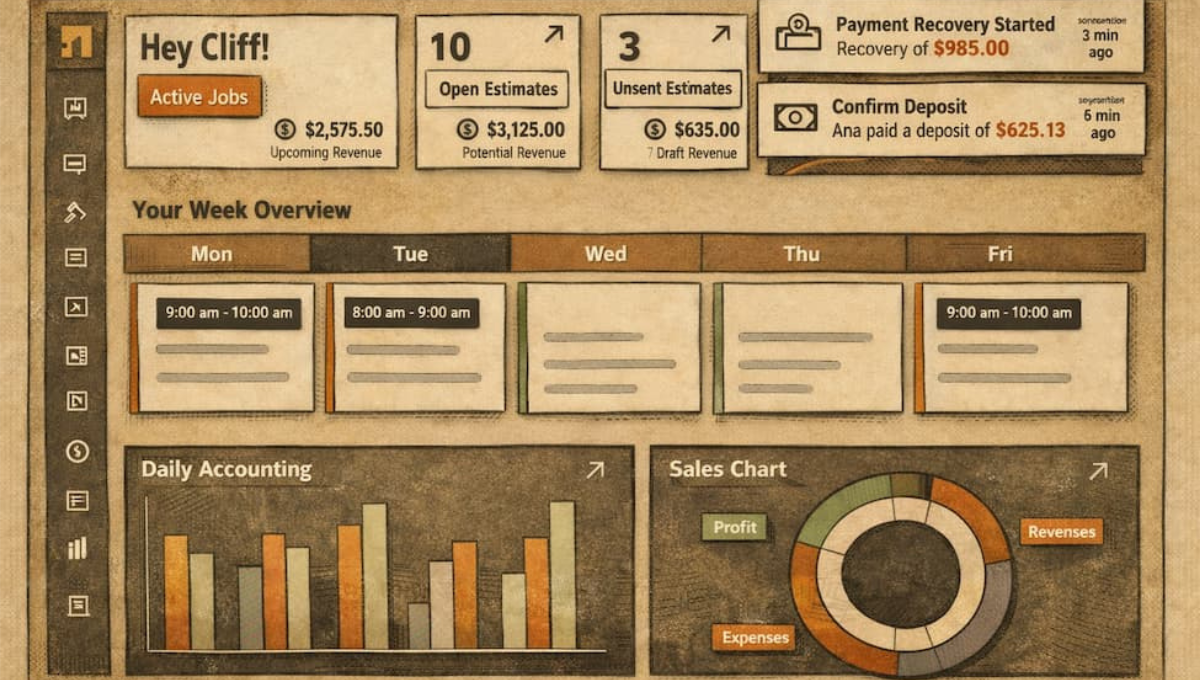
This Clientility review covers pricing, features, pros and cons to help you decide if it’s the right software for your service-based business. Designed for simplicity and efficiency, Clientility helps manage jobs, schedules, estimates, and payments in one place, making it a streamlined alternative to platforms like Jobber, Housecall Pro, and ServiceTitan.
Verdict: Clientility is best suited for small to mid-sized service businesses looking for a simple, all-in-one CRM without unnecessary complexity.
Key takeaway: If you want a CRM that’s easy to use and focused on workflow efficiency rather than complexity, Clientility is a strong option to consider.
*You can also compare Clientility with other tools in our guide to the best field service management software in 2026.
Quick Verdict: Is Clientility CRM worth it?
Overall Score: ★ 4.5 / 5
Clientility is a strong all-in-one CRM for service-based businesses that need lead management, job tracking, scheduling, estimates, and payments without the complexity of enterprise CRMs. It stands out for its ease of use and streamlined workflows, though its integration options are more limited compared to larger CRM platforms.
If you run a service business and want a clean, modern CRM that focuses on essential workflows rather than a large integration ecosystem, Clientility CRM is well worth considering in 2026.
Clientility Pricing & Value
| Plan | Price | Users | Best For |
|---|---|---|---|
| Individual | $45 | 1 user | Solo service professional |
| Team | $75 | Up to 5 users | Growing service businesses |
Individual Plan Includes
- Lead management
- Quickbooks integration
- Conversion strategy
- Easy estimates
- Drag & drop scheduling
- Client portal
- Credit card support
- Pricebook
Team Plan Includes
- Everything in the Individual Plan
- Live GPS tracking
- Advanced analytics
- Mobile phone system
- Worker portal
Pricing & Value ★★★★★ (4.8 / 5)
“With the conversion tools, we are able to convert leads we would normally forget about.”
— Ameen, Founder of Northern Kitchen Designs
*source: clientility.com
Clientility Core Features
Estimates & Scheduling
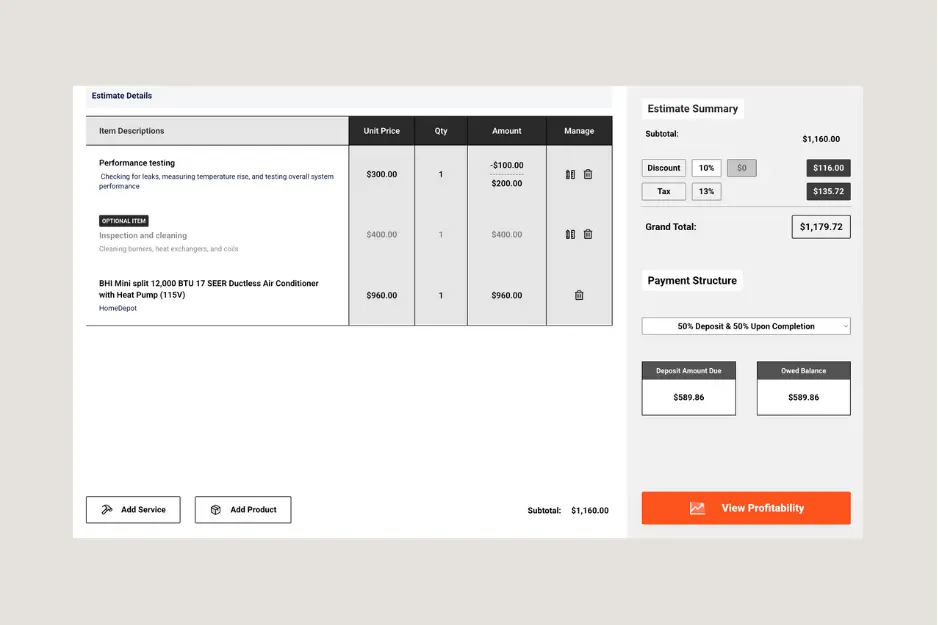
Clientility offers a flexible quoting and payment system designed for service-based businesses that want more control over pricing, presentation, and how they get paid. One standout feature is the ability to create up to three estimates for a single job, commonly structured as Good, Better, and Best options. This allows you to upsell services or present customers with clear pricing choices without creating multiple separate quotes.
Estimates can be built quickly using products and services from the price book, which automatically populate pricing when available. This helps maintain consistency and reduces manual entry, especially for businesses that reuse the same services or materials. Line items can also be marked as optional, giving customers flexibility while keeping the estimate clean and professional.
Clientility provides detailed control at the line-item level. You can apply markups and costs per item, add discounts as either a fixed dollar amount or a percentage, and even apply a discount to the entire estimate when needed. This makes it easier to protect margins while still offering competitive pricing.
On the scheduling side, Clientility allows businesses to create and manage events directly within the platform. Events can be assigned to specific teams, and customers are automatically notified via SMS or email based on their preferred communication method. All scheduling details are also accessible through the client portal, providing clear visibility for the customer.
Scheduling capabilities include:
- Create and assign events to teams
- SMS and email notifications based on customer preference
- Client portal access for event tracking
- Arrival windows such as ‘1 to 2 PM’
- Recurring events for weekly or monthly services
- Daily, weekly, and monthly calendar views
- Filtering by employee or event type
- Event reminders
Overall, Clientility CRM keeps estimates and scheduling closely connected, helping service businesses move from approved quote to scheduled work with clearer timelines, fewer delays, and less manual coordination.
Estimates & Scheduling ★★★★☆ (4.3 / 5)
Lead Management & Conversion
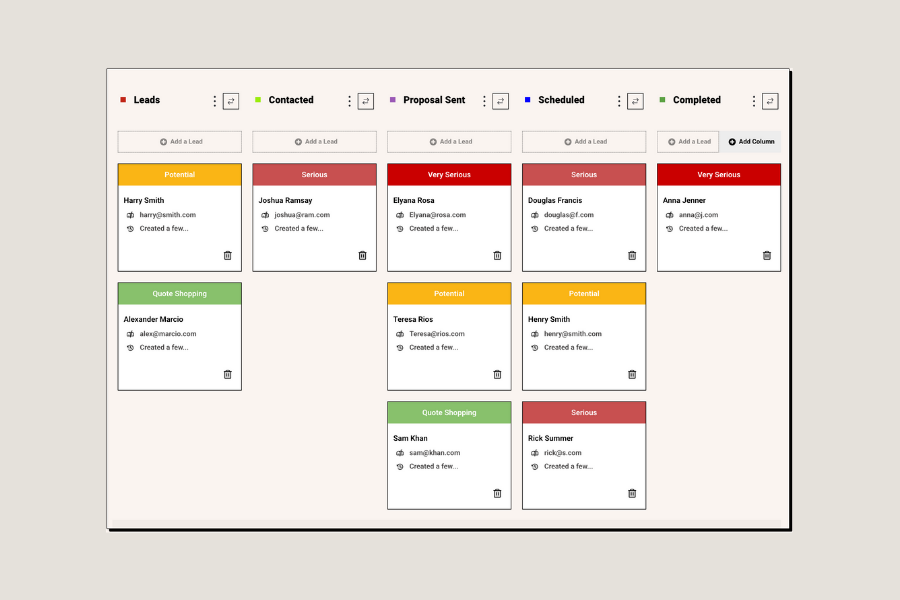
Clientility provides a structured yet flexible system for managing leads and converting them into booked work. At the center of its lead management functionality is a Kanban-style board, allowing teams to visually track and move leads through customizable stages. Businesses can create their own columns with custom titles, making it easy to reflect their actual sales process rather than forcing a rigid pipeline structure.
Each lead appears as an individual card that can be dragged and dropped between columns, creating a clear visual overview of progress. Leads can be assigned priority levels to help teams focus on high-value opportunities first. When a customer is ready to move forward, a lead can be converted into an estimate at any time, with all line items and details preserved. This is especially useful when customers take time to decide, as nothing needs to be rebuilt when it is time to finalize pricing.
Key lead management features include:
- Kanban-style board with customizable columns
- Drag-and-drop lead cards
- Priority labels for each lead
- Convert leads into estimates at any time
- Assign leads to specific team members
- Individual lead boards per team member with owner-level visibility
- Watchable columns and leads for update tracking
- Activity feed that records all changes and updates
Clientility also supports collaborative lead management. Leads can be assigned to specific team members and organized by column, while each team member can maintain their own lead board. At the same time, business owners retain full visibility across all boards, ensuring oversight without micromanagement.
Beyond organization, Clientility includes strong lead conversion tools designed to help service businesses close more jobs. One standout feature is the ability to send Good, Better, and Best estimates in a single proposal, allowing businesses to present multiple pricing options and naturally upsell additional services.
Clientility also offers built-in conversion strategies, an automated follow-up system structured in two stages to guide customers from quote to approval.
The first stage focuses on encouraging the customer to view the estimate. It includes two follow-ups that are scheduled automatically for every customer, though they can be customized on a per-client basis.
The second stage focuses on getting the estimate approved and includes two more advanced follow-ups:
- A link featuring a testimonial from a satisfied customer to build trust
- A final follow-up with a limited-time discount countdown designed to encourage the customer to proceed
This structured approach helps businesses stay proactive without appearing pushy, improving approval rates while maintaining a professional customer experience.
Clientility also includes a robust Review Boost feature designed to strengthen online reputation and build trust with future customers. Once a job is completed, the system can automatically send an internal satisfaction survey that can be fully customized with your preferred questions.
Businesses can set a minimum star threshold. If the customer’s rating meets or exceeds that threshold, they are prompted to leave a review on Google. If the rating falls below the threshold, the feedback remains internal, allowing businesses to address concerns privately rather than publishing negative reviews.
To further enhance credibility, businesses can include after-job photos alongside the Google review link, enabling customers to attach images to their reviews and showcase completed work to future clients.
Overall, Clientility CRM lead management and conversion tools combine visual workflow organization, automated follow-ups, and reputation management features to help service businesses stay organized, close more work, and build long-term customer trust.
Lead Management & Conversion ★★★★☆ (4.4 / 5)
Payments & Accounting
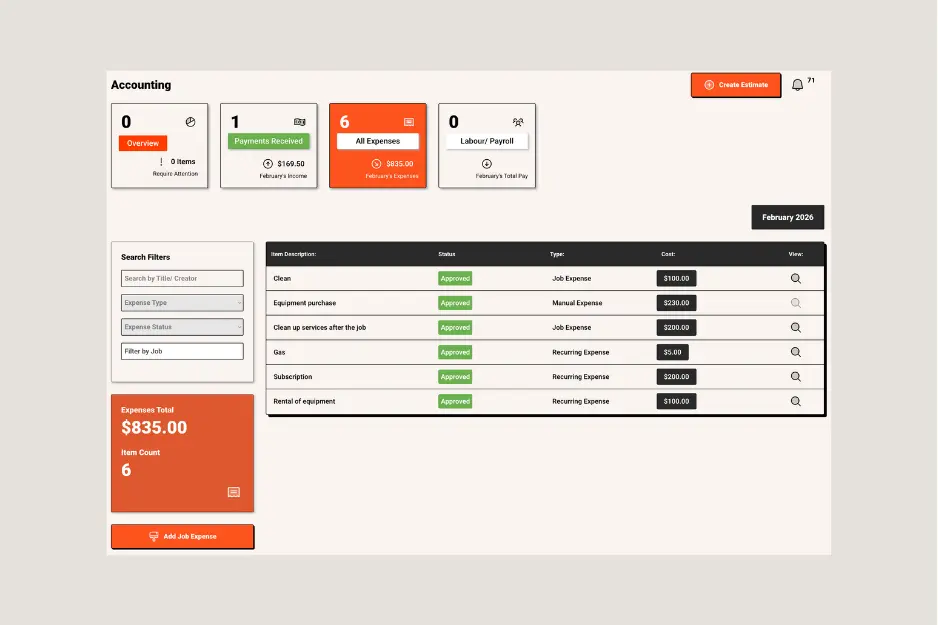
Clientility combines flexible payment collection with practical accounting tools, giving service-based businesses clear financial visibility from estimate to final payment. By keeping payments, expenses, and profitability tracking in one system, Clientility reduces manual reconciliation and helps businesses stay on top of cash flow.
On the payment side, Clientility supports multiple payment methods, allowing businesses to collect payments in the way that works best for their operations. Supported payment types include:
- Cash
- Cheques
- Card reader payments
- Direct deposit
- E-transfer
- Credit card payments through Stripe integration
Payment structures are fully customizable. Businesses can request a deposit up front, full payment in advance, or payment upon completion. Customers can view, make, and confirm payments directly through the client portal, while payment statuses update automatically for both the business and the customer.
Clientility also includes strong accounting capabilities, highlighted by an advanced QuickBooks integration that syncs clients, jobs, payments, line items, and expenses. This ensures financial records remain accurate across platforms without duplicate data entry.
Within the platform, businesses can track expenses to maintain accurate job costing and profitability insights. Expense tracking options include:
- Automatic expenses calculated from line item costs and totals
- Recurring expenses for monthly overhead or subscriptions
- Manual expenses entered as needed
- Job-specific expenses
Expenses entered by employees remain pending until reviewed and approved by the account owner, ensuring oversight and financial accuracy.
As estimates are built, Clientility provides real-time profitability insights. By factoring in costs, markups, labor hours, employee pay rates, and miscellaneous expenses, businesses can see profit margins before approving a job. This helps prevent underpricing and supports smarter decision-making.
Overall, Clientility CRM keeps estimates, payments, and accounting tightly connected, helping service businesses move from quote to payment faster while improving financial accuracy and profitability tracking.
Accounting & Payments ★★★★☆ (4.2 / 5)
Ease of Use & UI
Clientility is designed with usability at the forefront, making it easy for service-based businesses to adopt the platform without a steep learning curve. The interface is clean, modern, and logically structured, allowing users to move between leads, estimates, scheduling, and job management without confusion.
Navigation is intuitive, with clearly labelled sections and workflows that follow the natural progression of a job from start to completion. New users can quickly understand where to find key tools, reducing onboarding time and minimizing the need for extensive training.
The dashboard presents essential information in a clear and organized layout, helping teams stay focused on priorities without feeling overwhelmed. Visual workflows, drag-and-drop functionality, and consistent design patterns make daily tasks faster and more efficient.
Clientility’s usability strengths include:
- Clean and modern interface design
- Intuitive navigation between core workflows
- Visual boards and drag-and-drop functionality
- Clear job and workflow progression
- Minimal learning curve for new users
- Consistent layout across desktop and mobile use
The platform is optimized for real-world field use, allowing teams to access information quickly whether they are in the office or on-site. Mobile accessibility ensures that scheduling updates, job details, and customer information remain easily available throughout the day.
Overall, Clientility CRM ease of use and thoughtful interface design reduce friction in daily operations, helping businesses spend less time navigating software and more time completing work efficiently.
Ease of Use & UI ★★★★★ (4.8 / 5)
Clientility CRM Pros and Cons
Pros
- Intuitive interface and easy learning curve
- Best value for your money
- Designed for field service professionals and contractors
- Mobile-first and intuitive interface for quick adoption
- Mobile and web access
- Deep QuickBooks integration
Cons
- Limited advanced enterprise features
- Limited third-party integrations
Is Clientility CRM worth it in 2026?
For service-based businesses, Clientility CRM is absolutely worth considering in 2026. It delivers the tools that matter most, lead management, conversion automation, estimating, scheduling, payments, and financial tracking, plus more, in a clean, easy-to-use platform.
While it does not offer the deep integrations found in larger CRM systems, Clientility focuses on everyday workflow efficiency. The result is a system that helps businesses stay organized, close more jobs, and get paid faster without unnecessary complexity.
If you run a service business and want a reliable CRM that improves operations without slowing you down, Clientility offers excellent value and a strong return on investment.
*If you’re looking to generate more reviews, see how Clientility’s Review Boost helps increase Google reviews.
FAQs
Is Clientility a CRM?
Yes, Clientility is a CRM designed specifically for service-based businesses and contractors. It goes beyond traditional customer management by combining lead tracking, estimates, scheduling, job management, and payments in one platform, helping businesses manage the entire customer lifecycle from first inquiry to final payment.
Does Clientility integrate with QuickBooks?
Yes, Clientility syncs clients, jobs, payments, line items, and expenses with QuickBooks for seamless accounting.
Who is Clientility best for?
Clientility is best suited for service-based businesses such as contractors, home service providers, and field service teams that need to manage leads, estimates, scheduling, and payments in one platform.
Does Clientility offer a mobile app?
Yes, Clientility offers a mobile app that allows users to manage leads, create estimates, schedule jobs, track work, and collect payments directly from their phone. This makes it especially useful for contractors and field service teams who need access to job details while on-site.





Helpful review, thanks for sharing
Thank you!
Great review and I agree Clientility is quite nice
Thanks, really appreciate that!