


QuickBooks and Xero are two of the most widely used accounting platforms for businesses, each offering powerful tools to manage finances and streamline operations. While both are designed to simplify bookkeeping, they differ in key areas that matter most. This guide compares QuickBooks vs Xero across pricing, features, and ease of use to help you choose the right solution for your business.
Quick Overview: QuickBooks vs Xero
| Feature | QuickBooks | Xero |
|---|---|---|
| Best For | Growing & scaling businesses | Beginners & small businesses |
| Pricing | Mid-range | Mid-range |
| Ease of Use | Moderate | Easy to use |
| Automation | Strong | Advanced |
| Reviews | 1,268 reviews • TrustScore 1.1/5 | 10,794 reviews • TrustScore 4.1/5 |
What is QuickBooks?

QuickBooks is an accounting software developed by Intuit, designed to help businesses manage their finances, invoicing, expenses, payroll, and reporting in one system.
While it’s widely used and feature-rich, QuickBooks can feel slightly more complex for new users, especially during initial setup. However, once configured, it provides a strong and structured accounting system with powerful tools for tracking business finances and preparing for taxes.
It remains a popular choice for businesses that want a more traditional, accounting-focused platform with deep functionality and broad industry adoption.
Key Features of QuickBooks
After understanding what QuickBooks is, it’s important to look at the features it offers in day-to-day use. QuickBooks provides a comprehensive set of tools designed to manage finances, streamline bookkeeping, and support business growth.
QuickBooks Core Features
- Invoicing & Payments: Create and send invoices, track payment status, and accept online payments
- Expense Tracking: Automatically track and categorize expenses by connecting bank accounts and cards
- Financial Reporting: Generate reports like profit and loss, balance sheets, and cash flow summaries
- Payroll & Taxes: Manage employee payments, tax calculations, and filings
- Automation: Automate recurring invoices, transaction syncing, and basic categorization
- Bank Reconciliation: Match transactions with bank statements to ensure accuracy
- Multi-Device Access: Access your accounting data from desktop or mobile
QuickBooks Pricing
QuickBooks offers a range of pricing plans designed to support businesses at different stages, from solo entrepreneurs to larger teams. Each plan builds on the previous one, adding more users and advanced capabilities as your business grows.
| Plan | Price (Monthly) | Users | Best For |
|---|---|---|---|
| Simple Start | $38/mo | 1 user | Solo business owners getting started |
| Essentials | $75/mo | 3 users | Small teams needing more collaboration |
| Plus | $115/mo | 5 users | Growing businesses with more complex needs |
| Advanced | $275/mo | Custom users | Larger businesses needing deeper insights |
What is Xero?
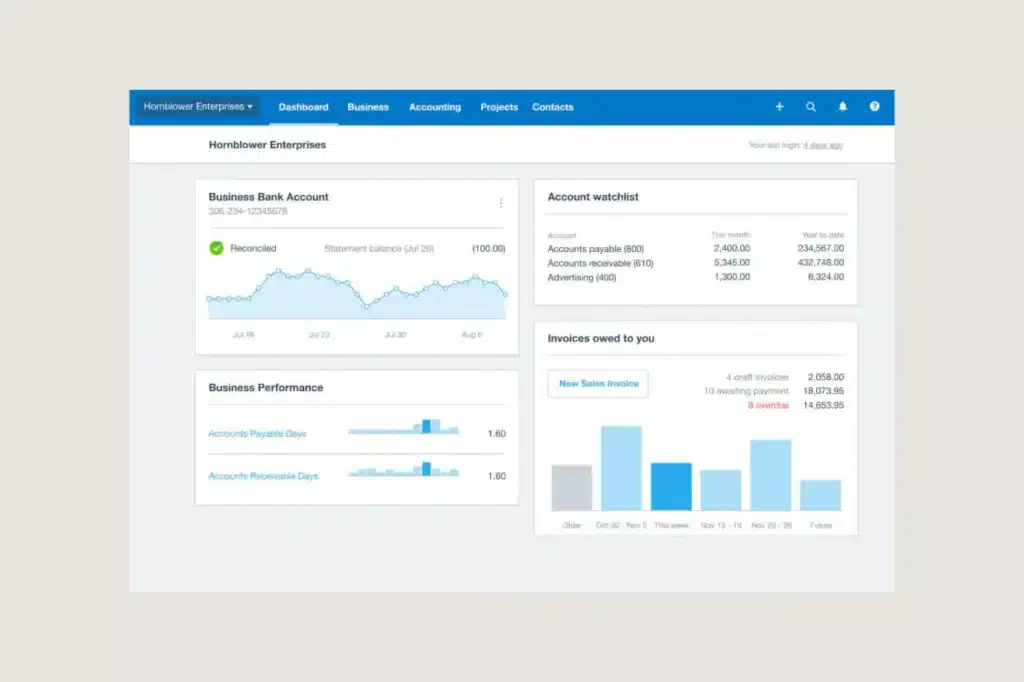
Xero stands out as a cloud-based accounting software designed for small and growing businesses that want a more modern and automated approach to financial management.
It offers tools for invoicing, expense tracking, bank reconciliation, and financial reporting, all within a clean and intuitive interface. With a strong focus on automation and real-time data, Xero helps businesses streamline their accounting processes and stay on top of their finances with minimal manual work.
One of the key differences in the QuickBooks vs Xero comparison is user access. Xero allows unlimited users on all plans, making it a strong option for teams that need multiple people, such as accountants, bookkeepers, and staff, accessing the system at the same time.
Key Features of Xero
As part of this QuickBooks vs Xero comparison, it’s important to understand what Xero offers in day-to-day use. Xero is built to simplify accounting through automation, real-time data, and a cloud-based experience.
Xero Core Features
- Invoicing & Payments: Create and send invoices, automate reminders, and accept payments online
- Expense Tracking: Capture and manage expenses, including reimbursements and spending tracking
- Bank Reconciliation: Quickly match transactions and keep financial records accurate
- Financial Reporting: Generate real-time reports to monitor performance and cash flow
- Automation: Automate recurring tasks like invoicing, payments, and transaction categorization
- Multi-User Access: Invite unlimited users to collaborate on the same account
- Inventory & Projects: Track inventory, manage projects, and monitor costs in one place
- Multi-Currency Support: Handle international transactions and operate globally
Xero Pricing
| Plan | Price (Monthly) | Best For |
|---|---|---|
| Early | $25/mo | Sole traders or businesses just starting out |
| Growing | $55/mo | Small businesses needing more flexibility |
| Established | $90/mo | Growing businesses with more advanced needs |
QuickBooks vs Xero: Final Comparison
When comparing QuickBooks vs Xero, both platforms offer strong accounting capabilities, but they cater to slightly different business needs. QuickBooks provides a more structured and traditional approach with guided workflows and deep functionality, while Xero focuses on a cleaner interface, automation, and flexibility. For businesses that value simplicity and established systems, QuickBooks remains a reliable choice, whereas Xero is often better suited for those looking for a more modern, scalable, and collaborative accounting experience.
Depending on what type of business you run, the right tools can go beyond accounting software alone. For service-based businesses in particular, managing clients, scheduling, and day-to-day operations is just as important as tracking finances.
Tools like Clientility, which integrate with QuickBooks, help bring these workflows together by streamlining client management and operations in one place. If you want a deeper look at how it works, check out our Clientility review.
FAQS
Is QuickBooks better than Xero?
Neither is universally better; it depends on your business needs. QuickBooks is often preferred for its structured, guided approach, while Xero is known for its clean interface, automation, and flexibility.
Which is easier to use, QuickBooks or Xero?
Xero is generally considered more modern and intuitive, especially for users who prefer a clean dashboard. QuickBooks can feel more structured and slightly more complex at first but offers guided workflows.
Does Xero or QuickBooks allow multiple users?
Xero allows unlimited users on all plans, making it strong for team collaboration. QuickBooks limits the number of users depending on the plan you choose.