
If you’re wondering is Jobber worth it in 2026, you’re not alone. Jobber is one of the most well-known platforms for service businesses, helping contractors, cleaners, and trades organize their scheduling, invoicing, and customer management in one place. It’s widely used because of its simplicity and reliability.
However, as businesses grow and software options continue to evolve, many owners are starting to re-evaluate whether it’s still the best fit for their needs. In this full review, we’ll break down its pricing, features, pros and cons, and who it’s actually best for, so you can decide if it’s the right choice for your business in 2026.
What is Jobber?
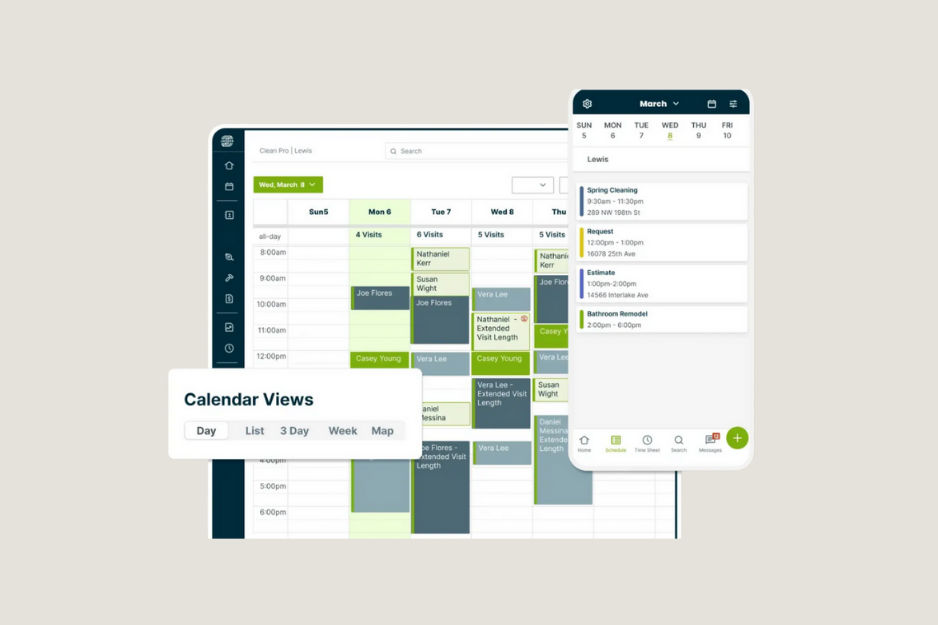
Jobber is a field service management software designed to help service-based businesses manage their day-to-day operations more efficiently. It brings together key tasks like scheduling, invoicing, customer management, and job tracking into one platform.
The software is mainly used by contractors, cleaners, landscapers, HVAC technicians, plumbers, and other service professionals who need a simple way to organize jobs and communicate with customers.
One of Jobber’s main strengths is its ease of use. It’s built to reduce manual admin work so business owners and teams can focus more on completing jobs and growing their business, rather than getting stuck in paperwork or scattered tools.
Jobber at a Glance (Quick Overview)
| Category | Details |
|---|---|
| Software Type | Field Service Management Software |
| Best For | Contractors, cleaners, trades, service businesses |
| Core Features | Scheduling, invoicing, and job tracking |
| Ease of Use | Designed to be simple |
| Mobile App | Yes (iOS & Android) |
| Pricing Model | Subscription-based (tiered plans) |
| Main Strength | Keeps operations organized |
| Main Limitation | Can become costly |
Key Features of Jobber
Jobber is designed to help service businesses manage daily operations more efficiently by combining multiple tools into one platform. Understanding these features is important when deciding is Jobber worth it in 2026, since its overall value comes from how well these tools work together.
Key features include:
Mobile App for Field Teams: Technicians can access job details, update statuses, and communicate with the office while on the go, improving real-time coordination.
Scheduling & Job Management: Easily assign jobs, manage team availability, and organize work using a simple calendar system that helps reduce scheduling conflicts.
Invoicing & Payments: Create and send professional invoices to customers and accept online payments, helping businesses get paid faster with less manual follow-up.
Customer Management: Store customer details, job history, and communication in one place to stay organized and improve customer relationships.
Quotes & Estimates: Quickly create and send quotes to customers for approval, helping streamline the process before starting work.
Automated Notifications & Reminders: Stay on top of communication by automatically sending appointment reminders, job updates, and follow-ups to customers.
Jobber Pricing in 2026
Jobber uses a subscription-based pricing model with different plans designed to fit businesses at various stages of growth.
The pricing generally scales based on the number of users and the features included in each plan. Lower-tier plans focus on basic tools like scheduling and invoicing, while higher-tier plans unlock more advanced features such as automation, reporting, and team management tools.
For many service businesses, Jobber can provide strong value when fully utilized, especially since it combines multiple tools into one system. However, when more advanced functionality is required, the overall cost can increase.
When considering is Jobber worth it in 2026, it’s important to evaluate not just the price itself, but how many separate tools it may replace in your current workflow.
- For Individuals:
| Core: 1 user | $49/mo |
| Connect: 1 user | $139/mo |
| Grow: 1 user | $199/mo |
- For Teams:
| Connect: Up to 5 users | $199/mo |
| Grow: Up to 10 users | $399/mo |
| Plus: Up to 15 users | $699/mo |
*as of Apr 13, 2026.
Pros of Jobber
Jobber is widely used by service businesses because it offers a reliable and organized system for managing daily operations.
- Robust integrations Jobber connects with other business tools, helping streamline workflows and reduce manual work.
- Mobile and web access Users can manage their business from both desktop and mobile, making it easy to stay updated in the office or in the field.
- Designed for service professionals and contractors The platform is built specifically for service-based industries, which makes it practical and easy to adapt for real-world use.
Cons of Jobber (Considerations)
When evaluating is Jobber worth it in 2026, it’s also important to look at a few limitations depending on business size and needs.
- Advanced features are tied to higher-tier plans Some tools that growing businesses may need are only available in more expensive plans or add-ons.
- Pricing can feel high for larger teams While Jobber offers strong value, costs can increase as your team grows and more features are required.
Who Jobber is Best For
Jobber is best suited for service-based businesses that want a simple and organized way to manage their daily operations without dealing with overly complex systems.
It tends to work best for:
- Small to mid-sized service businesses: Companies that need a straightforward system for scheduling, invoicing, and customer management.
- Contractors and tradespeople: Including plumbers, electricians, HVAC technicians, landscapers, and similar service professionals.
- Teams focused on simplicity and organization: Businesses that want a simple platform.
- Businesses looking to centralize operations: Companies that want to replace spreadsheets or multiple tools.
Overall, Jobber is a strong fit for businesses that value ease of use and structure over highly advanced or heavily customized workflows.
Best Jobber Alternatives in 2026
While Jobber is a strong and widely used platform, some businesses eventually explore alternatives depending on their size, budget, or need for more advanced features. This is especially common for companies that are growing quickly or reassessing is Jobber worth it in 2026 for their specific workflow and long-term needs.
Below are some of the most commonly considered Jobber alternatives in 2026:
1. Housecall Pro
Housecall Pro is a popular alternative known for its strong customer communication tools and simple interface. Compared to Jobber, it tends to appeal more to teams that prioritize having additional customer-facing tools within the platform.
2. ServiceTitan (for larger companies)
ServiceTitan is typically used by larger service companies that require advanced reporting, call booking systems, and deeper operational features. Compared to Jobber, it is significantly more complex and expensive, but powerful for high-volume businesses that have outgrown simpler systems.
3. Clientility
Clientility is built for service businesses that want a simple, modern way to manage their operations without using multiple tools. It combines scheduling, customer management and a built-in marketing funnel to capture leads and follow up automatically, helping businesses turn more inquiries into customers.
Compared to traditional platforms like Jobber, Clientility is designed to be more lightweight, faster to use, and one of the cheapest options available for growing service businesses when evaluating is Jobber worth it in 2026.
*Read the full comparison here: Clientility vs Jobber (In-Depth Breakdown)
4. FieldPulse
FieldPulse is designed for small to mid-sized teams that want more flexibility in managing workflows. While Jobber focuses on simplicity and structure, FieldPulse offers more customization options, which some businesses prefer.
Final Verdict – Is Jobber Worth It in 2026?
So, is Jobber worth it in 2026?
Jobber is still a strong and reliable platform for service-based businesses, especially for teams that want a simple, organized system to manage scheduling, invoicing, and customer jobs in one place.
However, whether it is the right choice depends on your specific needs and how your business operates. Some companies may find it perfectly suitable for their workflow, while others may prefer more flexible or cost-efficient solutions depending on their growth stage.
Overall, Jobber remains a solid option in 2026, but it’s important to compare it with other tools and choose the platform that best fits your long-term business goals.
What is Jobber used for?
Jobber is used by service-based businesses to manage daily operations such as scheduling jobs, sending invoices, tracking customers, and organizing team workflows in one platform.
Are there better alternatives to Jobber?
Some businesses may explore alternatives depending on their needs, especially if they require more customization, lower pricing options, or additional features.
Does Jobber offer good value for money?
It works well for service businesses that primarily need scheduling, invoicing, and basic customer management in one system.
However, some users find that as their business grows, certain features they need are only available in higher-tier plans or add-ons. This means the overall cost can increase over time depending on the level of functionality required.
Who should use Jobber?
Jobber is best suited for contractors, cleaners, landscapers, plumbers, electricians, and other service professionals who want a system to manage jobs and customer communication.