






Running a contracting business gets messy fast when estimates, job details, customer messages, schedules, and payments are spread across different tools. FieldPulse is built to help service businesses bring more of that work into one system. In this FieldPulse review, we’ll take a closer look at how it works, what it offers, how its pricing is handled, where it may fall short, and which alternatives contractors may want to compare before choosing a platform.
FieldPulse: Quick Overview
| Category | Quick Overview |
|---|---|
| Software | FieldPulse |
| Type | Field service management software |
| Best For | Contractors and service businesses that need help managing jobs, customers, schedules, estimates, invoices, and payments |
| Key Features | Customer management, scheduling, estimates, invoices, payments, job tracking, team communication, mobile app |
| Pricing | Not publicly listed; businesses need to contact FieldPulse for a quote |
| Good Fit For | Growing service businesses that want more organized operations in one platform |
| May Not Be Best For | Contractors who want fully transparent pricing before booking a demo |
| Alternatives | Clientility, Jobber, Housecall Pro, Service Fusion |
What is FieldPulse?
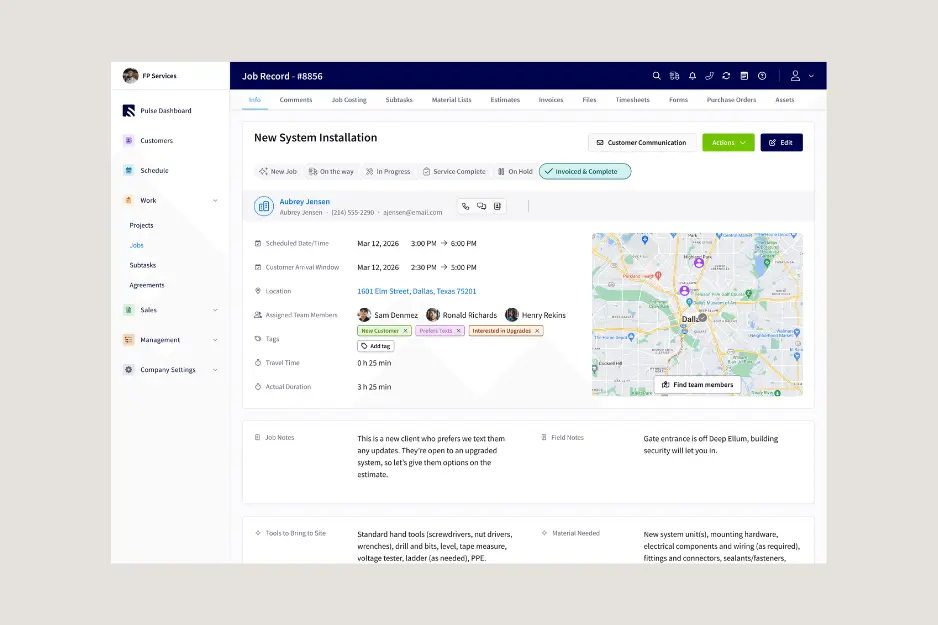
FieldPulse is a field service management platform designed to help contractors run the operational side of their business from one place. Instead of only acting as a basic customer database, FieldPulse focuses on the full job workflow: storing customer details, creating estimates, scheduling work, sending invoices, collecting payments, and keeping office staff and technicians connected.
For service businesses that are growing beyond paper notes, spreadsheets, or scattered apps, FieldPulse is meant to bring the main parts of the job process into a more organized system.
FieldPulse Essential Features
FieldPulse is built around the everyday workflow of a service business, not just simple contact tracking. The platform gives contractors tools to handle customer information, job details, scheduling, estimates, invoices, payments, and field updates without having to jump between several disconnected systems.
- Customer Management: Keeps customer details, job history, notes, and service records organized.
- Scheduling & Dispatching: Helps office teams assign jobs, manage technician availability, and keep daily schedules organized.
- Work Order Management: Allows teams to create, manage, and assign work orders, making it easier to track job details from the first request through completion.
- Estimates & Invoices: Gives contractors a way to quote work, bill customers, and keep financial steps connected to the job process.
- Mobile App: Let’s technicians view schedules, update job details, manage work orders, upload job records, and handle field updates while on-site.
- Workflow Automation: Includes customizable workflows and automation-style tools that help reduce manual steps, keep teams aligned, and manage processes more consistently. Businesses with more advanced automation needs may want to compare how flexible these workflows are against larger enterprise platforms.
FieldPulse Pricing: What to Know
FieldPulse does not appear to publish standard pricing plans on its website, so contractors will need to contact the company or request a demo to get an exact quote.
From a buyer’s perspective, that makes it harder to compare FieldPulse side by side with tools that show monthly pricing upfront.
*As of May 21, 2026.
FieldPulse Pros and Cons
Before choosing any field service software, it helps to look at both the strengths and the trade-offs. This FieldPulse review looks at where the platform can be useful for contractors, along with a few areas businesses may want to compare before making a decision.
FieldPulse Pros
Designed around service work: FieldPulse is built for businesses that manage jobs in the field, so it feels more relevant for contractors than a general CRM that only focuses on contacts, leads, and sales pipelines.
Covers the main job workflow: The platform brings together tools for scheduling, dispatching, work orders, estimates, invoices, customer management, and mobile updates, which can help contractors keep more of the job process connected.
Useful for teams outgrowing basic tools: FieldPulse can make sense for service businesses that are moving past spreadsheets, paper notes, or simple calendar apps and need a more structured way to manage daily operations.
Mobile access for field staff: Technicians can access job details, update records, and stay connected while working on-site, which helps reduce back-and-forth between the field and the office.
FieldPulse Cons
FieldPulse pricing is not shown upfront: Contractors need to contact FieldPulse for a quote, which can make it harder to compare pricing against other field service software options.
May not be ideal for solo contractors and small teams: Solo contractors or small businesses may not need every feature included.
Setup may take some time: New users may need time to configure the system properly and get comfortable with how everything works.
Best FieldPulse Alternatives for Contractors
As part of this FieldPulse review, it is worth looking at a few alternatives before choosing a field service software. FieldPulse may be a strong option for some contractors, but businesses that want more transparent pricing, a simpler setup, or a platform that better matches their estimate, job, payment, and follow-up workflow may want to compare a few other choices first.
1. Clientility
Clientility is a contractor-focused field service management software that gives businesses a quality, affordable way to manage leads, estimates, jobs, scheduling, follow-ups, payments, and client portals in one place. It can be a strong FieldPulse alternative for contractors who want practical features, a modern experience, and a platform that does not feel bigger or more complicated than their business needs.
One of the main differences is that Clientility focuses heavily on helping contractors win more jobs and get paid more reliably. Features like professional estimates, automated follow-ups, payment tools, and client-facing portals can help service businesses stay organized from the first lead to the final payment.
Clientility is worth considering for contractors who want a field service CRM that feels practical, modern, and built around the way small and growing service businesses actually work.
* For a more detailed breakdown, see our full Clientility CRM review.
2. Jobber
Jobber is one of the more well-known field service software options for contractors and home service businesses. It helps teams manage customer information, quotes, scheduling, invoicing, payments, and day-to-day job details from one platform.
As a FieldPulse alternative, Jobber may appeal to contractors who want a polished system with a familiar name in the field service space. It is especially popular with small and growing service businesses that want to move away from paper notes, spreadsheets, or disconnected tools.
That said, contractors should still compare Jobber’s pricing, features, and workflow against their actual business needs. A platform can be popular and still not be the best fit for every trade, team size, or budget.
3. Housecall Pro
Housecall Pro is another well-known field service software option for home service businesses. It gives contractors tools for scheduling, dispatching, estimates, invoicing, payments, customer communication, and job tracking.
As a FieldPulse alternative, Housecall Pro may be worth comparing if you want a platform that is built around day-to-day service work and customer communication. It is especially relevant for businesses that need to book jobs, manage technicians, send invoices, and keep customers updated from one system.
4. Service Fusion
Service Fusion is a FieldPulse alternative that may appeal to contractors who want a more operations-focused system for running service calls, dispatching technicians, and keeping job information organized.
For contractors reading this FieldPulse review, Service Fusion is worth comparing if your biggest pain points are dispatching, job coordination, and keeping office-to-field communication clear. It can be a useful option for businesses that want a more structured way to manage service work as the team gets busier.
Final Verdict: Is FieldPulse Worth It for Contractors?
FieldPulse can be a strong option for contractors who want to manage jobs, customers, schedules, estimates, invoices, and field teams in one place. It brings together many of the tools service businesses expect from modern field service management software, especially for growing teams that need more structure.
This FieldPulse review also shows that contractors should compare pricing, setup, and ease of use before deciding. Since pricing is not listed publicly, you may need to contact FieldPulse directly to see if it fits your budget.
Overall, FieldPulse is worth considering, but it is smart to compare it with alternatives like Clientility, Jobber, Housecall Pro, and Service Fusion to find the platform that best matches your workflow, team size, and budget.
How much does FieldPulse cost?
FieldPulse does not appear to publish standard pricing plans publicly on its website. Contractors need to contact FieldPulse or request a demo to get an exact quote based on their team size, needs, and setup.
Does FieldPulse have a mobile app?
Yes, FieldPulse offers mobile access for field teams.
Is FieldPulse a CRM?
FieldPulse includes CRM-style tools, but it is more than a basic CRM. It is field service management software that helps contractors manage customers, jobs, scheduling, estimates, invoices, payments, and field operations.
What are some FieldPulse alternatives?
Some FieldPulse alternatives contractors may compare include Clientility, Jobber, Housecall Pro, and Service Fusion. The best choice depends on your budget, team size, workflow, and whether you want a simpler field service CRM or a larger field service management platform.







[…] * For a more detailed breakdown, see our full FieldPulse CRM review. […]